PC Plus HelpDesk - issue 235
This month, Paul Grosse gives you more insight into
some of the topics dealt with in HelpDesk
|
 |
HelpDesk
Up-times on Windows and Linux systemsOlder DOS/Windows systems used an interrupt period of 55ms (or a frequency of 18.2Hz) so that the system can get on with doing one task and then, after the interrupt, start doing another thus giving the impression that it could do many things at the same time.
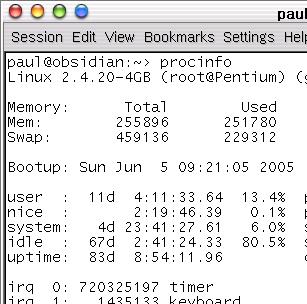
However, with machines having clock speeds in the GHz range, a period of 55ms would give 55,000,000 cycles per time slice which could be more than enough to finish off completely many tasks that the computer is used for, leaving enormous tracts of time where the processor was waiting for the next job which was waiting for the processor to have some time allocated to it. With this in mind (and probably a fair number of other things as well), Windows NT used a clock interrupt period of 10ms (100Hz) for one processor (but 15ms for two) and the Linux operating system up to kernel 2.4 uses a clock interrupt speed of 100Hz. If you look at the screen shot on the right, you can
see that if you take the number of timer clicks
(720325197) and divide it by 100, you get the uptime in
seconds (with an error in this case of 1 click).
The problem of having too many clock interrupts per second is that there is a certain overhead involved in processing each interrupt - if the processing becomes a significant part of each cycle then the overall performance of the machine suffers. If you have a fast processor with an efficient operating system that was designed from the outset to be truly multi-tasking then faster time slices are all right. |
 This worked for quite
a time (when I started with computers around 30 years
ago, mainframes used an interrupt frequency of 50Hz
giving time-slices of 20ms) - the desktop PC was not as
powerful as a mainframe so a slower interrupt for
timeslicing was all right.
This worked for quite
a time (when I started with computers around 30 years
ago, mainframes used an interrupt frequency of 50Hz
giving time-slices of 20ms) - the desktop PC was not as
powerful as a mainframe so a slower interrupt for
timeslicing was all right.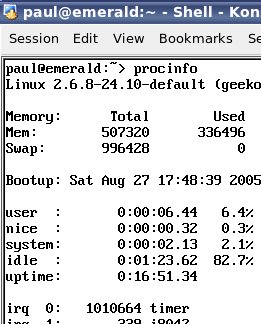 In Linux with the 2.6
kernel, the interrupt frequency has changed to 1kHz (1ms)
so a process on a 1GHz machine has just short of
1,000,000 clock ticks to work in.
In Linux with the 2.6
kernel, the interrupt frequency has changed to 1kHz (1ms)
so a process on a 1GHz machine has just short of
1,000,000 clock ticks to work in.