PC Plus HelpDesk - issue 212
This month, Paul Grosse gives you more insight into
some of the topics dealt with in HelpDesk
|
 |
HelpDesk
Windows Bitmaps for the DesktopWindows 98 through to XP will take an image and when stretch is selected, will make the image fit the screen, regardless of its original aspect ratio (the ratio of the width and the height). Copy the files in a zip across to your machine by clicking here. Whilst this is something of a nuisance when text is involved, it can be used to make smooth colour transitions such as in the following:
|
|||||||||||||||||






Camera Focal Lengths - the camera always liesIn issue 207, we covered how to make a USB webcam take close-ups at almost zero cost by using a low-cost lens recovered from a disposable camera. This issue, Emma Tandy asks how we can find the new depth of field. Compound lenses
However, this is not the whole story. With small format cameras or digital cameras, the maximum number of lines per unit distance across the negative or detector is limited which means that the cone of 'focussed light' can be wider - forming a triangle at the object and in the focal plane - which in turn means that the object can have some depth within the space that is in focus. This space is called depth of field (depth of focus is the same concept but at the negative or detector). Beyond infinityAn artefact of this is if the lens is focussed on infinity, there is a depth of field in front of that and also a depth of field 'beyond infinity' As there are no objects that we can see that are beyond infinity, this extra depth of field can be used so that the lens is focussed at a point that is, say 4m away and from 4m to infinity is the part that is in focus beyond and between 4m and 2m is the part that is in focus in front of this. Focussing at a point that is in front of infinity but using the depth of field to make everything up to infinity in focus is called 'hyperfocal focussing' and is dependent upon the depth of field. On an SLR lens, you can see the guide depths of field based on the F number and an assumption about the size of the final print (miniature - 35mm - cameras are based on the assumption that the final use will be a 10x8" blow-up). To calculate the new depth of field, you need to use the depth of field that is given and assume that it is hyperfocally focussed (you aren't going to be able to change the focus on a webcam). If you take the infinite focal length and the close focal length and work out the new values based on the focal length of the lens, you can work out the depth of field for the new lens combination. The formula is 1/u + 1/v = 1/f where u and v are the focal lengths of the lenses and f is the focal length of the combination (note that if you measure the strengths of lenses in diopters, ie its strength is 1/[focal length in metres], you can just add these values together). You know the focal length of the new lens (hold it up so that it casts an image from a source far away and measure the distance) and you know the near and far distances in the focal range. That is all there is to it. As the song says; 'science is easy.' Depth of field
The top and the bottom of the building are out of focus but if we stop down the lens (increase the F number), we can make the cone of light narrow enough to give the impression that it is in focus. Something that some people don't like though is the
converging verticals (because we all know that the real
building sides are parallel). Removing rectilinear distortion
Rising front
Now, what about those converging horizontals? - let's face it: a 2D representation of a 3D object is only a lie so the camera always lies. Note that theoretically speaking, parallel planes
coincide at infinity. Apparently extraordinary depth of focus
Although this might seem a little esoteric, if you have a second hand camera that its previous owner has dropped badly, the lens mount might be off enough to cause this effect which will explain those peculiar photographs it takes. |
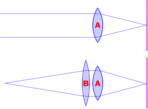 At the
top, we have a normal lens (A) focussed at what we all
assume to be infinity and below it, we have added another
lens (B) to bring 'in focus objects' closer.
At the
top, we have a normal lens (A) focussed at what we all
assume to be infinity and below it, we have added another
lens (B) to bring 'in focus objects' closer.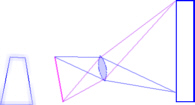 This depth
of field can be used to take photographs of things that
have depth and give the impression that it is all in
focus. In the example on the right, we see how the rays
go (the lines representing roughly where on the negative
or detector they go rather than whether or not they are
in focus) when we take a photograph of a building.
This depth
of field can be used to take photographs of things that
have depth and give the impression that it is all in
focus. In the example on the right, we see how the rays
go (the lines representing roughly where on the negative
or detector they go rather than whether or not they are
in focus) when we take a photograph of a building.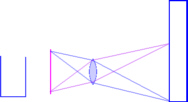 To combat
this, we can make sure that the film plane, the lens
plane and the object plane are all parallel, therefore
they will all be in focus and there will be no
rectilinear distortion. However, we can now only
photograph the bottom half of the bulding.
To combat
this, we can make sure that the film plane, the lens
plane and the object plane are all parallel, therefore
they will all be in focus and there will be no
rectilinear distortion. However, we can now only
photograph the bottom half of the bulding.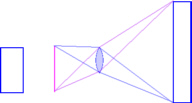 In order
to get around this problem, larger cameras such as medium
format and plate cameras get around this by using a lens
that can produce a larger image than the negative. If
this lens (which as the same focal length as the ordinary
lens) is slid upwards on the rising front, the planes are
all still parallel so all is in focus. Occasionally, in
the market place, you will find a miniature format (35mm
film format) rising front attachment.
In order
to get around this problem, larger cameras such as medium
format and plate cameras get around this by using a lens
that can produce a larger image than the negative. If
this lens (which as the same focal length as the ordinary
lens) is slid upwards on the rising front, the planes are
all still parallel so all is in focus. Occasionally, in
the market place, you will find a miniature format (35mm
film format) rising front attachment.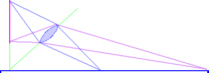 If you make
the lens and image planes coincide elsewhere, your object
plane of focus will intercept this point. If you wanted
to take a picture of some railway lines and you wanted
all of the sleepers to be in sharp focus, you make the
lens plane intercept the film plane at the sleeper level
by tilting the front of the camera. When the photograph
is blown up, people will comment on how clear and in
focus the whole image is.
If you make
the lens and image planes coincide elsewhere, your object
plane of focus will intercept this point. If you wanted
to take a picture of some railway lines and you wanted
all of the sleepers to be in sharp focus, you make the
lens plane intercept the film plane at the sleeper level
by tilting the front of the camera. When the photograph
is blown up, people will comment on how clear and in
focus the whole image is.Firewall event simulation computer modelThe log
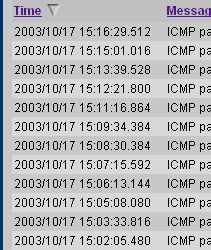
The shot on the right shows a bit of a typical log
with events occurring no more frequently than once per
minute. Ping rates
Whilst 35 per hour doesn't seem to be very many, the real number is quite different. The reason for the rate increasing is probably due to
increased traffic on the ISP's local subnet. The computer modelClick here to copy the computer model onto your system or run it directly from the disk (it does not write any files). It needs an environment that will run DOS. Although heavily bloated as DOS shells go, Windows will also do.
Clicking 'About' will give you some basic information
about the program and how to use it. Note also that the distribution of event intervals is not a 'normal' distribution. This is because the events are not all based on a single starting time (such as everybody switching on their computers at 9am or going online in the evening) but are from all over the network where there is no single trigger event. |
 Firewall
logs often have a time-based feature that, whilst it
still reacts as directed on events of a given type, it
will not log any more of them until the specified time is
over. For example, if you have specified a time of 60
seconds and you receive 5 events in a minute, then only
the first one will be logged. If nothing happens for
another two minutes, the next event will seem to have
happened around three or so minutes after the first.
While having a non-logging time of some description is
clearly effective at cutting down the firewall log, it
hides the magnitude of the real problem.
Firewall
logs often have a time-based feature that, whilst it
still reacts as directed on events of a given type, it
will not log any more of them until the specified time is
over. For example, if you have specified a time of 60
seconds and you receive 5 events in a minute, then only
the first one will be logged. If nothing happens for
another two minutes, the next event will seem to have
happened around three or so minutes after the first.
While having a non-logging time of some description is
clearly effective at cutting down the firewall log, it
hides the magnitude of the real problem.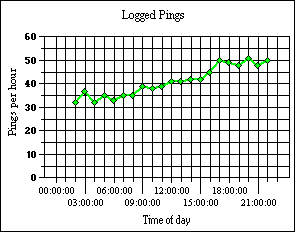 I set my firewall to
log dropped ICMP packets and it registered the type 0
packets at the hourly levels in the graph on the right.
I set my firewall to
log dropped ICMP packets and it registered the type 0
packets at the hourly levels in the graph on the right.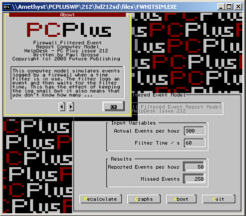 If you run the
computer model, you can put any number of hits per hour
in, up to a limit of 3600 and it will calculate how many
hits will be reported for the time limit that you have
specified. If you press the recalculate button a few
times, you will see how this number varies and you will
also get an idea of how underreported the actual figure
is.
If you run the
computer model, you can put any number of hits per hour
in, up to a limit of 3600 and it will calculate how many
hits will be reported for the time limit that you have
specified. If you press the recalculate button a few
times, you will see how this number varies and you will
also get an idea of how underreported the actual figure
is.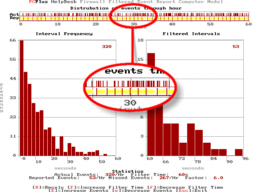 This is a
screenshot of the graphical output of the model. You can
see from the blowup section that the yellow bars
represent the 'time-out' time for the log - where nothing
gets reported. There are a lot of events in this time and
this is where the model comes in.
This is a
screenshot of the graphical output of the model. You can
see from the blowup section that the yellow bars
represent the 'time-out' time for the log - where nothing
gets reported. There are a lot of events in this time and
this is where the model comes in.Losing DHCP leasesDynamic Host Configuration Protocol (DHCP) is defined clearly in rfc2131 so the problem of losing your ISP allocated IP address should not happen in the first place. However, checking your firewall options, using the option to give your firewall a name and allowing it to be Pinged should help. Regarding allowing incoming Pings, one way of tackling the problem, if this turns out to be a solution that works, is to look at the firewall log and check the IP address of the host that pings you. If this is the DHCP server, it should coincide with the DHCP server's IP address - remember that you could have several servers although your firewall should be picking only one of them and respectfully ignoring the others. If this is the case, you can set up a firewall rule that will only allow Pings from the Internet if they come from the server that matters - the DHCP server or the host that checks to see if you still exist - nobody else should be able to ping you then. Note that your ISP's DHCP server might have a local address so might be in the form 10.x.x.x, 172.z.x.x where z is a number between 16 and 31, or 192.168.x.x, ie your LAN works on your local network and this is plugged into your ISP which is another, although larger local network with its own local addresses and so on although from the outside world, you appear to have a proper IP address - this is just mapped.
If you have got a substantial network, you don't have to let anybody know about it. Choosing 'Home' as your firewall name could save you from logging your ISP attacking your system to see if they can find more than two machines. |
 These
things should be done one step at a time to check what
works and what doesn't.
These
things should be done one step at a time to check what
works and what doesn't.Network UPS configuration for a server
Note that if your webserver has a security loophole in it that allows arbitrary commands to be executed, then none of the rest of the network can be considered safe so it is wise to keep up-to-date with security patches. |
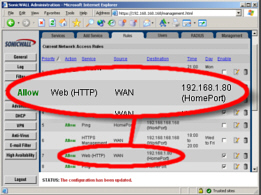 If you have more than
one http server on your machine - one for your webserver
and one for your UPS as an example - you should already
have them set up so that they are each available through
different ports (80 for the web server and, say, 8080 for
the UPS although they don't have to be these numbers).
If you have more than
one http server on your machine - one for your webserver
and one for your UPS as an example - you should already
have them set up so that they are each available through
different ports (80 for the web server and, say, 8080 for
the UPS although they don't have to be these numbers).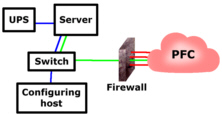 You can prevent your
UPS from being available to the Internet by blocking
everything other than port 80 at the firewall. If this
incoming port 80 traffic is passed by the firewall
through to the machine specified, at port 80 (or whatever
port you have specified for your webserver), it will work
all right. As this is the only machine that the firewall
will allow port 80 traffic through to, the others are
reasonably safe.
You can prevent your
UPS from being available to the Internet by blocking
everything other than port 80 at the firewall. If this
incoming port 80 traffic is passed by the firewall
through to the machine specified, at port 80 (or whatever
port you have specified for your webserver), it will work
all right. As this is the only machine that the firewall
will allow port 80 traffic through to, the others are
reasonably safe.Web translation for ChineseIf you have a site that is visited by people from all over the planet, you can expect some mail that needs translating. Big5
The part I've highlighted in blue tells me that it
uses the Chinese Big5 character set (the characters are
formed from the pairs of characters highlighted in red)
so, having checked that it contains no scripts (or having
removed any that were there by loading it into Notepad
and searching it for '<script' (no quotes)), I saved
it as a html file onto the desktop and loaded it into MS
Internet Explorer. Into GB
This one will allow you to translate between the two
in either direction, either from directly typed (or
copied) text, or from within HTML files, the latter going
to an output html file. |
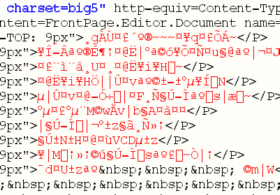 This is
the plain-text of an email I received and I needed to
find out whether it was a genuine enquiry or just junk
mail.
This is
the plain-text of an email I received and I needed to
find out whether it was a genuine enquiry or just junk
mail.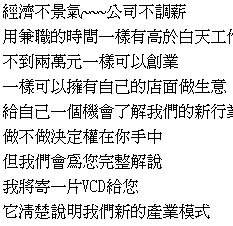 This is
the text that appeared and, personally, having no more
ability to read Chinese characters than I do to play Mah
Jong (the proper game, not the pairs matching game) it is
clearly a job for an online translator.
This is
the text that appeared and, personally, having no more
ability to read Chinese characters than I do to play Mah
Jong (the proper game, not the pairs matching game) it is
clearly a job for an online translator. Select
'Chinese to English' and click on 'Translate'.
Select
'Chinese to English' and click on 'Translate'. And this
is the result. As sometimes happens with these things,
there are so many hidden meanings and sayings convoluted
into everyday speech that the translated result can have
little meaning, let alone let the translator program have
a chance.
And this
is the result. As sometimes happens with these things,
there are so many hidden meanings and sayings convoluted
into everyday speech that the translated result can have
little meaning, let alone let the translator program have
a chance.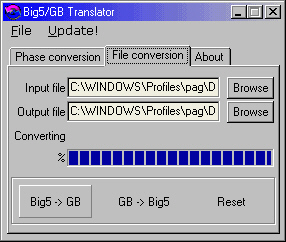 Chinese Big5 (or
traditional Chinese) is only one of the ways of writing
Chinese. Another popular notation is 'simplified Chinese'
(GB2312) and there are translators for free download on
the Internet.
Chinese Big5 (or
traditional Chinese) is only one of the ways of writing
Chinese. Another popular notation is 'simplified Chinese'
(GB2312) and there are translators for free download on
the Internet.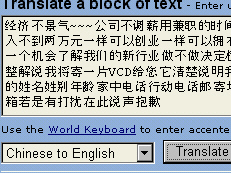 The new
text is coped into the AltaVista BabelFish translator and
the button clicked ...
The new
text is coped into the AltaVista BabelFish translator and
the button clicked ... ... and
this is the output. Sadly, nothing about rocket science -
just junk mail.
... and
this is the output. Sadly, nothing about rocket science -
just junk mail.Browser network appliance configurationAn increasing number of appliances that you are likely to have plugged into your network have a network browser configuration interface. Whilst this is clearly a good thing in so far as you can configure these appliances without even getting out of your seat, there is something that should be considered regarding access - security.
|
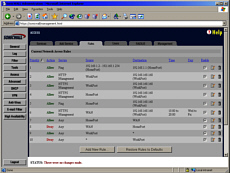 Firewalls
usually have a web interface and secure a connection
using SSL or, for those that do not use a web interface,
a COM socket on the back that only goes to one machine.
With a web browser interface using SSL, you can configure
a rule that allows you to configure the firewall from the
Internet only between certain times and, if required,
from a certain IP address if you really want to. Clearly,
firewalls that have a web browser interface have the
advantage here as having a specific machine that you have
to use locally to configure your firewall creates extra
hassle and expense.
Firewalls
usually have a web interface and secure a connection
using SSL or, for those that do not use a web interface,
a COM socket on the back that only goes to one machine.
With a web browser interface using SSL, you can configure
a rule that allows you to configure the firewall from the
Internet only between certain times and, if required,
from a certain IP address if you really want to. Clearly,
firewalls that have a web browser interface have the
advantage here as having a specific machine that you have
to use locally to configure your firewall creates extra
hassle and expense.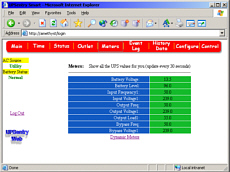 It is clear that a
UPS should be secured by a password (as this one is) as
it is capable of shutting down the machines it powers.
It is clear that a
UPS should be secured by a password (as this one is) as
it is capable of shutting down the machines it powers.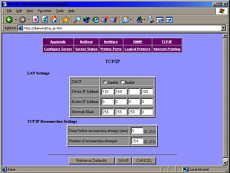 And you don't want
anybody configuring your printer for you from the other
side of the world
And you don't want
anybody configuring your printer for you from the other
side of the world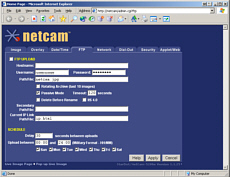 This is one of the
browser configuration screens that are used to configure
a webcam - a proper server that has its own network
interface, not a USB plug to go into a local machine. If
this is for a camera that is situated in the middle of
nowhere, you don't want to have to travel hundreds of
miles, visiting each one every time you want to change a
few server parameters.
This is one of the
browser configuration screens that are used to configure
a webcam - a proper server that has its own network
interface, not a USB plug to go into a local machine. If
this is for a camera that is situated in the middle of
nowhere, you don't want to have to travel hundreds of
miles, visiting each one every time you want to change a
few server parameters.


